Event sign-ups for your Discord server
Post an event and people tap to join. Roles with spots, a waitlist when it's full, reminders, and a ping when it starts. Free.
People tap to join
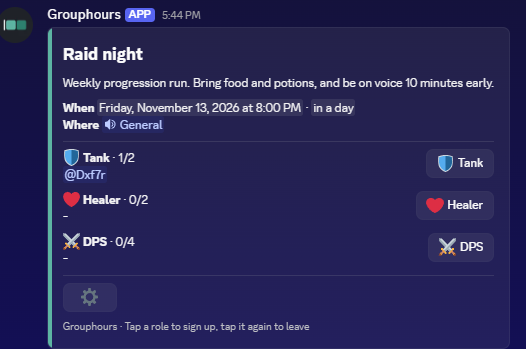
Each event is a card in your channel. People tap Sign Up, or the role they'll play, and their name shows under it straight away.
Tap again to leave. Times show in everyone's own timezone.
Make it without leaving Discord
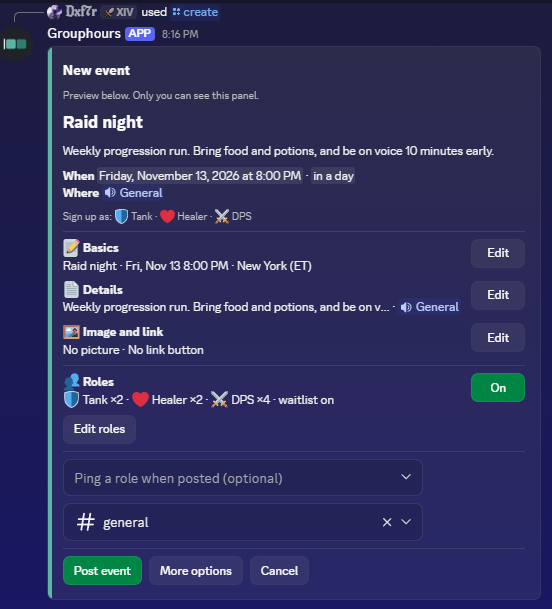
Type /create and a private editor opens. Add the time in plain words like "fri 8pm", details, a picture, a link and where to meet, then post it in any channel.
Only you see the editor until you post.
Roles with spots
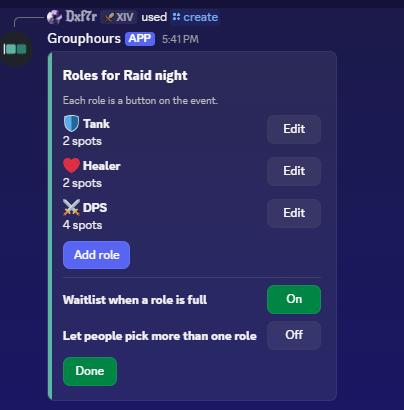
Turn on roles for raids, D&D or anything with parts to fill. Give each one an emoji and a number of spots.
When a role is full, the next people join a waitlist and move up if someone drops out.
And the rest of the night
- Reminders15 minutes to a day before, pinging everyone who signed up.
- Start pingAt the start time it pings them again and closes sign-ups.
- Every weekTurn on repeat and next week's event posts when this one ends.
- Role for sign-upsGive people a Discord role while they're signed up, removed after.
- Thread and Events listOpen a chat thread for the event, and add it to Discord's Events list.
- Edit on a big screen
/dashboardopens your server's events on grouphours.com.
Not sure when yet?
Type /plan and the bot posts a link where everyone marks when they're free. The times that work for most people light up.
Pick one, and the event card takes the link's place in the channel, ready for sign-ups.

Add Grouphours to your server
It takes a minute. Type /help once it's in. Questions? Read the FAQ.